NFS3 Mount Errors


NFS3: Mount Errors
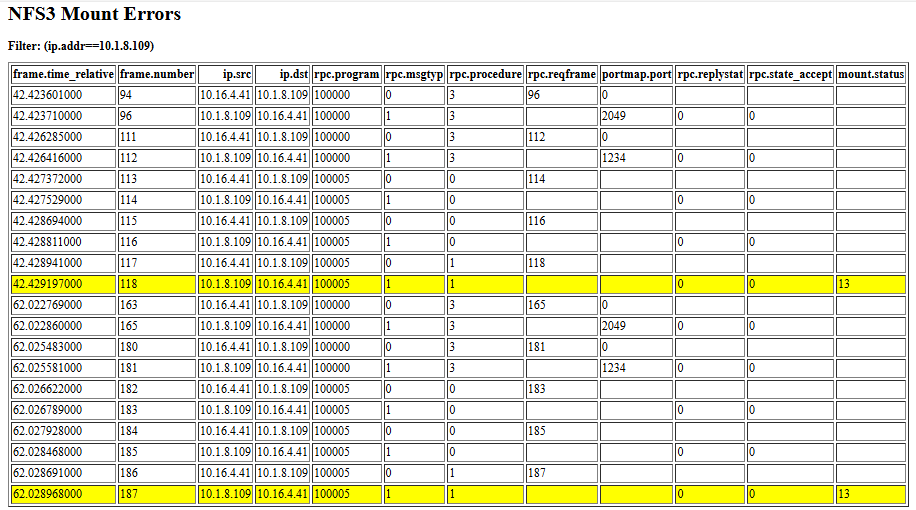
Three fields rpc.replystat, rpc.state_accept, and mount.status
Those three fields (rpc.replystat, rpc.state_accept, and mount.status) appear in Wireshark when analyzing the RPC reply to a MOUNTPROC_MNT call in NFSv3.
Let’s go through each in context of the NFS mount reply message.
1 rpc.replystat
Meaning:
This is the top-level RPC reply status, common to all ONC RPC programs (not specific to NFS).
Values:
Value Name Meaning
0 MSG_ACCEPTED The server received and processed the RPC request.
1 MSG_DENIED The server rejected the RPC request before invoking the actual program (e.g., auth or RPC version mismatch).
So, for a valid mount reply, you should see:
rpc.replystat: MSG_ACCEPTED (0)
If this field shows MSG_DENIED, the request never reached mountd logic — it failed earlier (e.g., due to bad auth or protocol mismatch).
2️ rpc.state_accept
Meaning:
This is a sub-status that appears only when rpc.replystat = MSG_ACCEPTED.
It tells you whether the server successfully executed the RPC procedure.
Values:
Value Name Meaning
0 SUCCESS RPC executed successfully.
1 PROG_UNAVAIL The called program (e.g., mountd) is not available on the server.
2 PROG_MISMATCH The program exists, but not the requested version.
3 PROC_UNAVAIL The specific procedure (e.g., MOUNTPROC_MNT) isn’t supported.
4 GARBAGE_ARGS Bad or malformed arguments.
5 SYSTEM_ERR Generic server-side failure.
So typically you’d expect:
rpc.state_accept: SUCCESS (0)
If it’s not SUCCESS, the mount operation failed at the RPC service level (before returning a mount.status).
3️ mount.status
Meaning:
This is the mount protocol–specific result code returned by the mountd program (MOUNTPROC_MNT procedure).
It’s inside the payload of the successful RPC reply.
Values (NFSv3 MOUNT protocol v3):
Value Constant Meaning
0 MNT_OK Mount request succeeded; file handle returned.
1 MNTERR_PERM Not permitted (e.g., export not allowed to client).
2 MNTERR_NOENT Export path does not exist.
5 MNTERR_IO I/O error during mount.
13 MNTERR_ACCES Permission denied (export restrictions).
20 MNTERR_NOTDIR Path is not a directory.
22 MNTERR_INVAL Invalid mount arguments.
10004 MNTERR_NAMETOOLONG Path name too long.
So in Wireshark:
mount.status: MNT_OK (0)
means the server returned a valid file handle.
Example (Successful Mount Reply)
Wireshark decode:
RPC Reply
rpc.replystat: MSG_ACCEPTED (0)
rpc.state_accept: SUCCESS (0)
mount.status: MNT_OK (0)
mount.fhandle: 0x00000001f2b4a7d...
Meaning:
✅ RPC was accepted
✅ RPC was successfully executed
✅ Mount succeeded — server returned a valid NFS file handle
❌ Example (Failure)
rpc.replystat: MSG_ACCEPTED (0)
rpc.state_accept: SUCCESS (0)
mount.status: MNTERR_ACCES (13)
RPC reached the server and was processed correctly,
but the export denied the client (e.g., not in /etc/exports allowed list).
Overview
In NFSv3, mounting is not handled directly by the NFS protocol itself.
Instead, it involves two protocols:
Portmapper (rpcbind) – tells the client what port each RPC service is using.
MOUNT protocol (mountd) – authenticates and provides a file handle for the exported filesystem.
NFS protocol – used after mounting to perform file operations.
Step-by-Step Mount Flow
1. Portmapper (rpcbind) query
Protocol: RPC (program 100000)
Purpose: Find which port mountd and nfsd are listening on.
Client → Server:
Calls PMAPPROC_GETPORT asking for the port of:
MOUNT program (100005)
NFS program (100003)
Server → Client:
Returns UDP/TCP port numbers for these services.
2. MOUNT Protocol – Get Export List
Program: mountd (RPC program 100005)
Procedure: MOUNTPROC_EXPORT
Purpose:
Client retrieves the list of exported file systems (optional, often done by showmount -e).
3. MOUNT Protocol – Mount Request
Procedure: MOUNTPROC_MNT
Client → Server:
Sends a request with the export path (e.g., /data).
Includes the client’s hostname or IP (for export access checking).
Server → Client:
Verifies if the client is allowed to mount that export.
If allowed, returns a file handle that represents the root of the export.
Example RPC:
Program = MOUNT (100005)
Version = 3
Procedure = MOUNTPROC_MNT (1)
Arguments = path = "/export/data"
Reply:
status = 0 (OK)
fhandle = [NFS file handle for export root]
4. Mount Success
The client kernel stores the file handle as the root of the mounted filesystem.
From now on, all file operations use NFSv3 RPCs directly to the nfsd service on the server.
5. NFS Operations Begin
After the mount is complete:
The client starts using NFSv3 procedures:
LOOKUP, GETATTR, READ, WRITE, READDIR, etc.
These go to:
Program: NFS (100003)
Version: 3
6. (Optional) Unmount Procedure
When unmounting:
The client may send a MOUNTPROC_UMNT RPC to inform the server to clear the mount record.
Simplified Sequence Diagram
Client Server
| |
| PMAPPROC_GETPORT (MOUNT) ----------------->|
|<-------------------------- mountd port ------------------------|
| PMAPPROC_GETPORT (NFS) ---------------------->|
|<--------------------------- nfsd port ----------------------------|
| MOUNTPROC_MNT("/export/data") ---------------->|
|<--------------- file handle -------------------------------------|
| NFS LOOKUP, READ, WRITE, etc. --------------->|
Notes
NFSv3 uses stateless server design – the client maintains context using file handles.
The mountd daemon only participates during mount/unmount, not during normal file I/O.
The NFS daemon (nfsd) handles all actual read/write/lookup RPCs.
Firewalls must allow:
rpcbind (port 111 TCP/UDP)
mountd (dynamic or fixed port)
nfsd (typically TCP/UDP 2049)
Example Trace Flow
