SMB


Basic SMB2 Workflow
NEGOTIATE → client and server agree on SMB version/features.
SESSION_SETUP → client authenticates (user login).
TREE_CONNECT → client connects to a share (like \\server\share).
CREATE / READ / WRITE → client performs file operations inside that share.
SMB2 Create
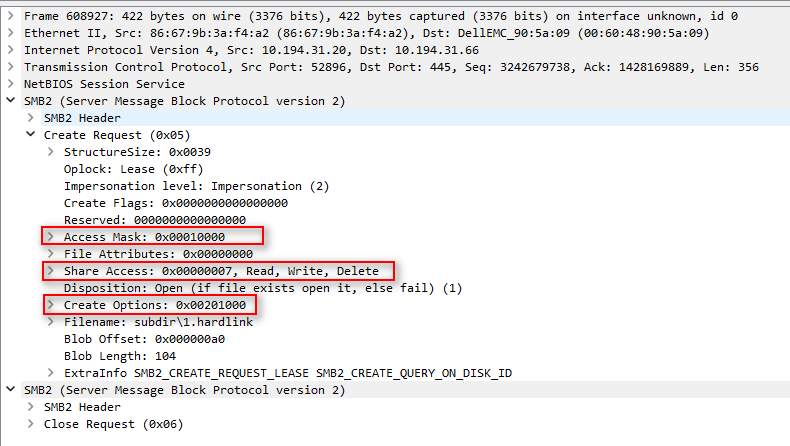
� 1. ACCESS MASK (Desired Access)
Field: RequestedOplockLevel, DesiredAccess
This specifies what the client wants to do with the file — i.e., the permissions it needs.
Mask Constant Meaning
0x00000001 FILE_READ_DATA Read file data.
0x00000002 FILE_WRITE_DATA Write file data.
0x00000004 FILE_APPEND_DATA Append data to the file.
0x00000008 FILE_READ_EA Read extended attributes.
0x00000010 FILE_WRITE_EA Write extended attributes.
0x00000020 FILE_EXECUTE Execute the file.
0x00000080 FILE_READ_ATTRIBUTES Read file attributes (size, timestamps).
0x00000100 FILE_WRITE_ATTRIBUTES Modify file attributes.
0x00100000 DELETE Delete the file.
0x00020000 WRITE_DAC Change file’s DACL (permissions).
0x00040000 WRITE_OWNER Take ownership.
0x00080000 SYNCHRONIZE Synchronize on handle.
0x10000000 GENERIC_ALL All possible access rights.
0x120089 (common) Typical “read” access used by SMB clients.
✅ Purpose:
This tells the server what operations the client wants to perform.
If the client asks for more access than allowed, the server returns STATUS_ACCESS_DENIED.
� 2. SHARE ACCESS
Field: ShareAccess
Specifies what other clients can do with the same file while this handle is open.
It controls how this handle shares the file with others.
Bit Constant Meaning
0x00000000 none Exclusive access (no sharing).
0x00000001 FILE_SHARE_READ Others can read.
0x00000002 FILE_SHARE_WRITE Others can write.
0x00000004 FILE_SHARE_DELETE Others can delete/rename.
Example:
0x00000007 = READ + WRITE + DELETE → fully shareable.
0x00000000 → exclusive lock.
If another opener’s share mode conflicts, the server returns STATUS_SHARING_VIOLATION.
✅ Purpose:
Controls concurrency rules between multiple clients accessing the same file.
� 3. CREATE OPTIONS
Field: CreateOptions
These are flags that modify how the file or directory should be opened or created —
they affect caching, delete-on-close, directory/file semantics, etc.
Mask Constant Meaning
0x00000001 FILE_DIRECTORY_FILE Must open/create a directory.
0x00000002 FILE_WRITE_THROUGH Write-through mode (no caching).
0x00000004 FILE_SEQUENTIAL_ONLY Optimize for sequential access.
0x00000008 FILE_NO_INTERMEDIATE_BUFFERING Disable caching.
0x00000010 FILE_SYNCHRONOUS_IO_ALERT Synchronous I/O.
0x00000020 FILE_SYNCHRONOUS_IO_NONALERT Synchronous I/O (non-alert).
0x00000040 FILE_NON_DIRECTORY_FILE Must open a file, not a directory.
0x00000100 FILE_DELETE_ON_CLOSE Delete file when handle is closed.
0x00000200 FILE_OPEN_BY_FILE_ID Open by file ID, not name.
0x00000400 FILE_OPEN_FOR_BACKUP_INTENT Backup/restore intent.
0x00002000 FILE_NO_COMPRESSION Don’t use compression.
0x00200000 FILE_OPEN_REPARSE_POINT Open reparse point itself.